

ProAI Beacon
Customer call answered
After-hours service inquiry
ProAI Beacon™ answers customer calls while your team is on the job, captures the details, and follows your rules for booking requests, callbacks, and handing calls to your team.
BEACON AT A GLANCE
Beacon answers customer calls, captures service details, and follows your approved rules for booking requests, callbacks, and human handoff. Review call activity and conversation summaries in one place.
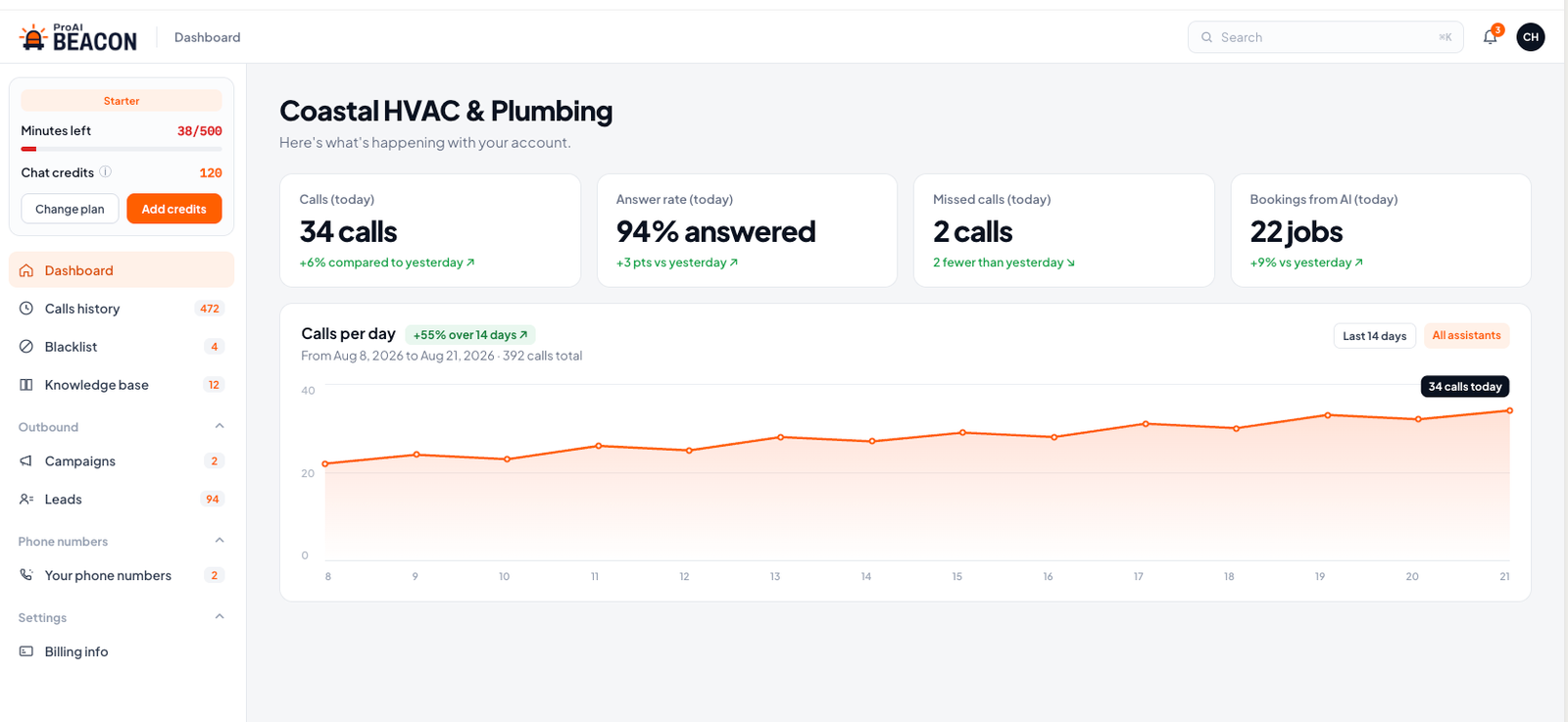
Illustrative dashboard example. Sample data shown.
Gather the caller’s service needs and relevant details.
Handle supported booking requests, callbacks, and human handoff according to the process approved during setup.
Review call activity and conversation summaries in one place.
What Beacon does not do: Beacon does not diagnose repairs, make emergency decisions, quote unapproved repair prices, or promise technician arrival times. Call handling follows the rules agreed during setup.
THE CALCULATOR
Every shop is different. Enter a few numbers from your business to see an illustrative estimate of how missed calls could affect job opportunities over a month or year.
Include calls from new customers and existing customers that could lead to service, an estimate, or a booked job.
Use your best estimate. If you are unsure, start with a conservative number and adjust it.
This is an assumption—not a promise. Use a cautious number based on your business.
Use your average invoice, service ticket, or estimated first-job value.
Add this only if you want to see an illustrative gross-profit estimate in addition to potential revenue.
The starting values are modest sample inputs only. Change them to your business’s real numbers.
This estimate is a planning tool. It uses the inputs you provide and does not predict, promise, or guarantee future bookings, revenue, profit, response time, or customer outcomes. Actual results depend on your call mix, service area, pricing, customer urgency, staffing, competition, and how quickly your team follows up.
Beacon helps your team keep customer calls, callbacks, after-hours requests, and follow-up from getting buried when the office is busy or closed.
See Plans and PricingChoose a plan, complete checkout, then schedule your guided onboarding.
REVENUE RECOVERY
Beacon supports approved follow-up on estimates, appointment confirmations, maintenance reminders, and past-customer outreach—then routes interested customers to your team.
Available as part of selected Beacon coverage.
Estimate follow-up
Follow up on approved estimate lists and capture the customer’s response.
Appointment confirmations
Support a consistent confirmation process for upcoming appointments.
Maintenance reminders
Contact customers about approved maintenance opportunities.
Past-customer outreach
Reconnect with approved past customers about relevant service opportunities.
Follow-up uses approved customer lists, contact windows, and business rules. Requests needing a person are handed to your team.
FITS YOUR WORKFLOW
Beacon fits into the tools and processes you already use. Connect your calendar, route new customer requests to the right person, and keep important call details and follow-up actions organized—without adding another complicated system to manage.
ServiceTitan · Housecall Pro · Jobber
Beacon can connect with these platforms for supported workflows. ProAI confirms the available connection and tests the agreed handling before activation.
Calendar scheduling
Support appointment requests based on your availability and booking rules.
Team notifications
Send qualified leads, urgent requests, and call summaries to the right person.
Customer details
Keep captured service details, conversation summaries, and next steps organized.
Follow-up workflows
Help your team act on missed calls, estimate decisions, renewals, and approved customer outreach.
Built for HVAC, plumbing, electrical, roofing, restoration, and multi-trade service businesses.
Capture the caller’s heating or cooling concern and relevant service details, then follow your approved response rules.
Collect initial details about leaks, drains, or other plumbing needs, then follow your approved callback or priority-routing process.
Capture the customer’s request and follow your approved handoff process when staff attention is needed.
GUIDED ACTIVATION
Beacon is not a tool you are expected to figure out alone. You share the business details and response rules that matter—your services, service area, hours, team contacts, booking boundaries, and the situations that need a person.
ProAI configures the workflow, tests the agreed customer-call scenarios with you, and confirms the go-live plan before Beacon handles live customer calls.
Tell us about your services, service area, hours, team contacts, and the customer calls that need priority attention.
ProAI prepares the workflow and captures where calls should go, when a person takes over, and what a clear next step looks like.
ProAI tests the workflow with you, refines the details, and activates Beacon when the agreed process is ready.
Your team stays in control of business rules, customer commitments, priority handoff, and any situation that requires human judgment.
Already selected your Beacon plan? Complete your business setup so we can prepare for Guided Activation.
Capture more customer requests, route the calls that need attention, and keep estimates and follow-up from going cold.